How-to Tradesly: Take Over Any AI Call with Voice Control
Stop fearing AI errors in call center automation. Tradesly lets you toggle between AI and human voice mid-call. See how to keep control of every customer conversation.
Here is the nightmare:
Your AI solution is handling a call. The customer asks a tricky technical question about a 5-ton unit. The AI starts to fumble. You are listening in, helpless, watching a $10,000 install slip away because the bot didn't know how to pivot.
That is why most AI voice solutions scare the hell out of smart business owners. You are either all-in on automation (and praying it doesn't screw up), or you are stuck doing everything manually.
We built Tradesly to fix this.
Tradesly gives you the best of both worlds. It lets your CSRs switch between AI voice and human voice instantly (mid-sentence if needed). Your team gets AI efficiency for 95% of the grunt work, with the confidence that they can jump in anytime.
Here is exactly how it works and when to use it.
What You'll NeedAn active Tradesly account
A stable internet connection
How Do I Start a Call with AI Voice Control?
When a call comes in, Tradesly AI Voice Agent answers automatically.
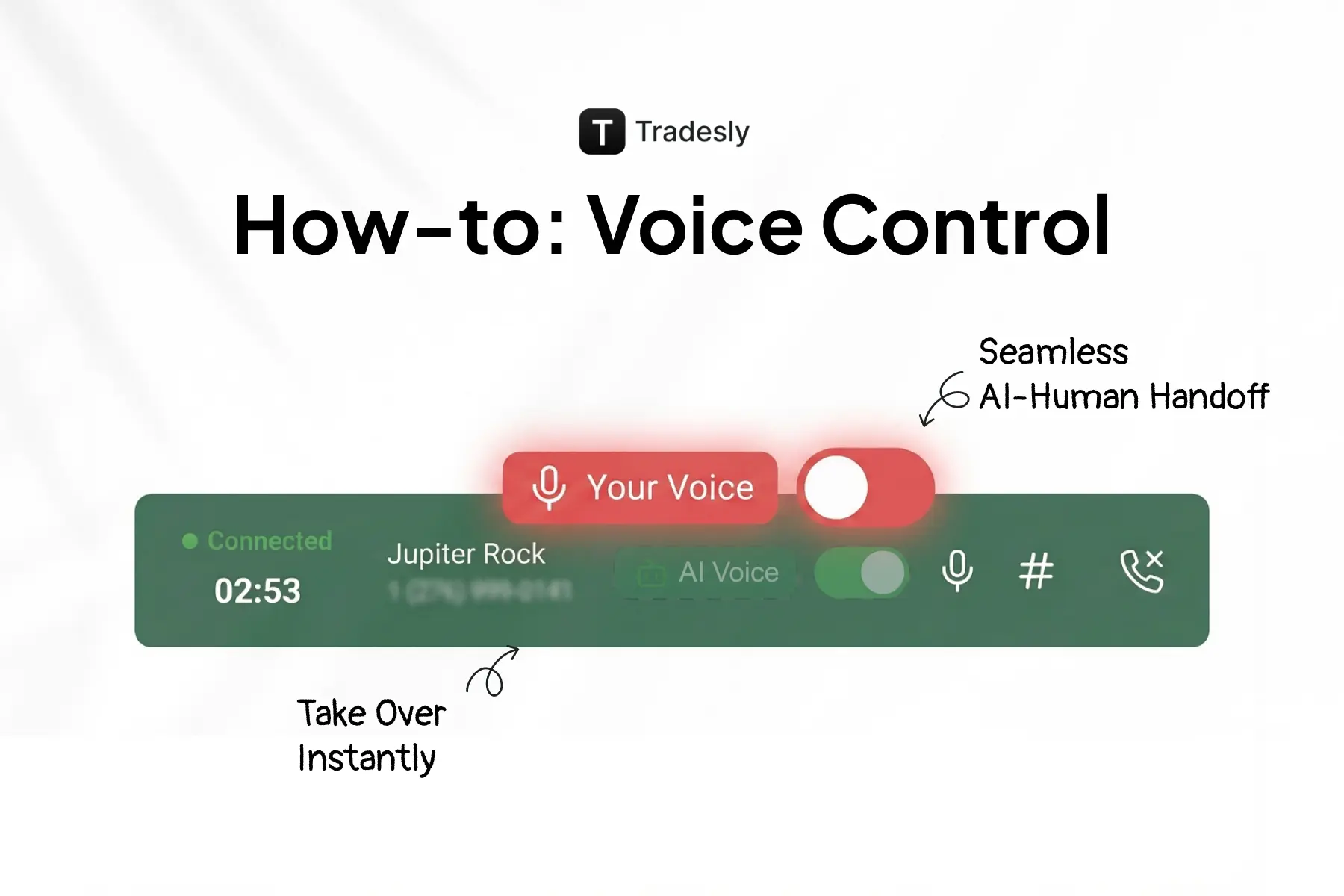
Your CSR sees the live call interface. The "AI Voice" toggle will be in the ON position (green).
Let the AI handle the greeting, qualification, and the standard "easy" questions. Your CSR just needs to monitor the conversation on the Live Call Script panel.
When Should I Take Over an AI Call?
Don't just watch. Listen. You are looking for three specific triggers:
The customer gets emotional. If they sound frustrated, upset, or overly excited, step in. AI is smart, but it doesn't have empathy.
The question gets technical. Complex troubleshooting, custom pricing, or unusual service requests are your territory.
The AI gets confused. If the bot repeats itself or gives a vague answer, kill it. Don't let it spiral.
How Do I Switch from AI to Human Voice?
Locate the Voice Toggle switch on the top-right corner of your screen, just above the live call transcript.
Click the toggle to turn AI Voice OFF.
The toggle turns red and displays "Your Voice".
The AI stops speaking immediately. Even if it was mid-sentence.
The customer hears a seamless transition. No awkward pause. No "transferring you now."
This is real-time call intervention at its best. You control the moment.
What Do I Do After Taking Over the Call?
Now you are in the driver's seat.
Address the customer's concern with human judgment. Use your expertise to troubleshoot or negotiate. You have the full context because the AI's conversation history is right there on the screen.
Can I Give Control Back to the AI?
Once you've put out the fire, you have two options:
Option A: Finish it yourself. Complete the booking and scheduling manually.
Option B: Give it back to the machine. Toggle AI Voice back ON (green). The AI resumes the conversation naturally, picking up exactly where you left off.
3 Best Practices for Using Tradesly Voice Control
1. Don't wait for a disaster.
The best operators are proactive. If you hear a customer getting annoyed, jump in before the AI misreads the tone.
2. Use the takeover for the close.
Let the AI handle the qualification and data entry. You jump in to close the high-ticket add-on.
3. Practice the handoff.
Run a few test calls with your team. Get comfortable with the timing. A smooth transition feels invisible to the customer.
Summary
You don't have to choose between AI speed and human control. Tradesly Voice Control gives you both.
The toggle isn't a "panic button." It is a strategic tool. It lets your team work smarter. Let the AI handle the grind. You handle the money.
FAQs About Tradesly Voice Control
How is this different from other AI voice solutions?Most platforms are "all or nothing." You either trust the bot completely or you don't use it. Tradesly is the only platform that lets you intervene mid-call without the customer noticing.
Does the customer know when I switch from AI to human?No. The transition is seamless. There is no "please hold" or robot noise. It just sounds like the agent continued talking.
Can I toggle back and forth multiple times?Yes. Toggle as much as you want. Use AI for the routine questions, jump in for the hard stuff, then hand it back.
Does this work with after-hours calls?No. After-hours calls are handled 100% by AI Voice Agents because no human is there to monitor them. This feature is for business hours when your team is at the desk.
Will customers get upset if they find out they were talking to AI?Only if you lie about it. Most customers don't care as long as they get fast, accurate service. The ones who do care will ask directly. Train your team to be honest: "Our AI handles the initial questions so we can get you scheduled faster. I'm here to help with anything complex." Simple. No drama.
Ready to take control?
Not a Tradesly customer yet? See how Tradesly Voice Control transforms your operation. Book a demo here to watch it in action.
Already using Tradesly? If you have questions about setting this up, email team@tradesly.com or call (917) 727-4868.