How-to Tradesly: Call QA with AI Insights
Stop staring at AI call metrics. Learn what Speech-to-Text, Intent, Sentiment, and Contextual Matching actually mean—and when to take action. 5-minute guide.
Most AI dashboards dump numbers on you without telling you what to do about them.
We don't.
By the end of this guide, you'll know exactly what each metric in Tradesly AI Insights means, when to worry, and what action to take. In 30 seconds or less.
This is the natural next step after real-time call monitoring. Visibility means nothing if you can't interpret what you're seeing.
What do you need to get started with AI Insights?
Access to your Tradesly dashboard
A completed AI-handled call with AI Insights generated
5 minutes to learn the system (then 30 seconds per call going forward)
What does AI Insights actually measure?
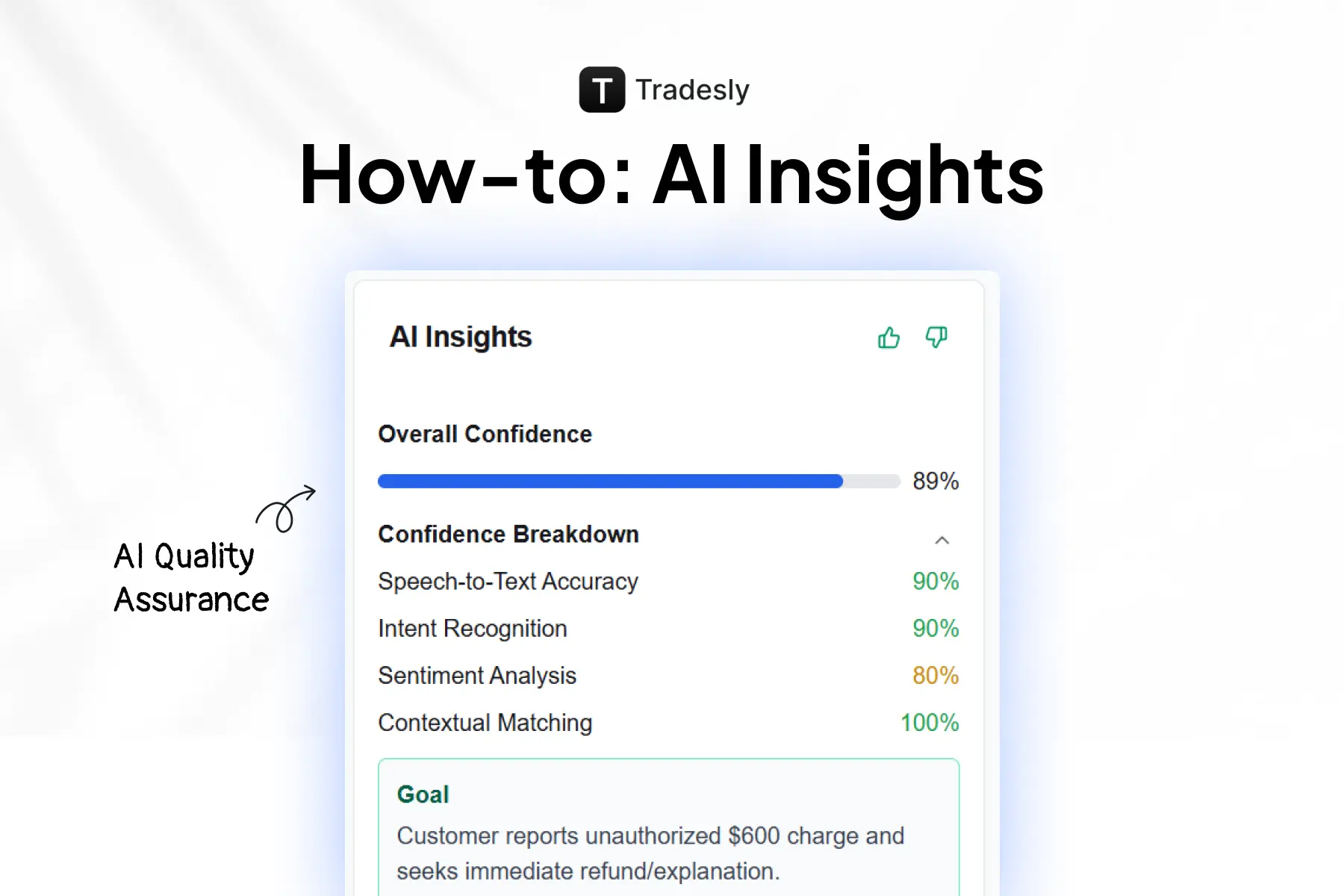
Tradesly AI Insights tracks four core call center metrics. Each one tells you something different about call quality.
Speech-to-Text Accuracy: How cleanly the AI transcribed the customer's voice. Low scores mean audio quality issues (speakerphone, background noise, heavy accents).
Intent Recognition: Did the AI correctly identify what the customer wanted? This tells you if the AI understood the purpose of the call.
Sentiment Analysis: Your customer satisfaction signal. Higher scores mean happier customers. Low scores flag potential churn risks.
Contextual Matching: How well the AI stayed on-topic throughout the conversation. This is your "did the AI sound coherent?" metric.
These four metrics work together.
High scores across the board means the AI nailed it. One low score means dig deeper.
Key Takeaway: Don't just look at one number. All four metrics tell a different part of the story.
What does Overall Confidence score mean?
This is your at-a-glance number. It's a weighted average of all four metrics.
Rule of thumb:
85%+ = AI handled it well. Spot-check only if you're curious.
70-84% = Worth a closer look. One metric is likely dragging it down.
Below 70% = Human review required.
Don't stop at Overall Confidence.
A call can score 82% overall but have a critical failure hiding in one metric.
Key Takeaway: Overall Confidence is your starting point, not your finish line.
How do I diagnose low AI call scores?
Walk through each metric with specific thresholds and actions.
Speech-to-Text AccuracyGreen (85%+): Transcription is reliable. Trust the summary.
Yellow (70-84%): Some words may be off. Skim the transcript if details matter.
Red (Below 70%): Audio quality issues. Don't rely on transcripts alone.
Action if low: Check call recording quality. Note for future if pattern emerges with specific customers.
Intent RecognitionGreen (90%+): AI knew exactly what the customer wanted.
Yellow (75-89%): AI got the gist but may have missed nuance.
Red (Below 75%): AI likely misrouted or misunderstood the request.
Action if low: Review the "Goal" field. Does it match what actually happened? If not, this call needs human follow-up.
Sentiment AnalysisGreen (80%+): Customer left satisfied or neutral.
Yellow (60-79%): Some friction detected. Customers may have been frustrated at points.
Red (Below 60%): Customer likely unhappy. Potential churn risk.
Action if low: Flag for manager review. Consider proactive follow-up call from human CSR.
This is where the 10X CSR concept comes into play. AI handles volume, humans handle exceptions.
Contextual Matching
Green (75%+): AI stayed on-topic and coherent throughout.
Yellow (50-74%): AI drifted or repeated itself. Conversation may have felt clunky.
Red (Below 50%): AI lost the thread. This is your biggest red flag.
Action if low: Immediate human review. This call is a candidate for AI call escalation or Voice Control takeover next time.
Key Takeaway: High Intent + Low Contextual = AI knew what they wanted but fumbled the delivery. This is your coaching opportunity.
Why does my AI score high overall but still sound off to customers?
This happens when one critical metric tanks while the others stay strong.
Example: 82% Overall Confidence with 20% Contextual Matching.
The AI transcribed correctly (high Speech-to-Text). It understood the request (high Intent). The customer wasn't angry (decent Sentiment). But the conversation was incoherent (low Contextual).
Result? The customer got what they needed, but the experience felt broken.
Key Takeaway: Always check individual call quality monitoring metrics. A high overall score can hide a terrible customer experience.
How can I review calls in 10 seconds?
Use the "Goal" and "Key Points" fields as your cliff notes.
The "Goal" field tells you what the customer wanted in one sentence.
"Key Points" extracts the critical details (name, address, email, service requested).
This is your 10-second call review in action.
Example from the dashboard: "Customer seeks a quote and options for lawn weed control service at their home."
You now know the call outcome without listening to a single second.
Key Takeaway: Goal + Key Points = instant call summary. Use it before you dig into metrics.
How do I quickly triage AI-handled calls?
Quick decision framework for every call:
Signal | Criteria | Action |
🟢 Green | 85%+ Overall, no metric below 70% | AI handled it. Move on. |
🟡 Yellow | 70-84% Overall OR one metric below 60% | Spot-check Goal + Key Points. Review if anything looks off. |
🔴 Red | Below 70% Overall OR Contextual below 50% | Human review required. Listen to the call or read full transcript. |
Build this into your morning routine.
5 minutes reviewing yesterday's red/yellow calls prevents customer complaints before they happen.
Key Takeaway: Green = trust it. Yellow = check it. Red = fix it.
What should I watch for over time?
Pattern recognition matters.
One low Contextual Matching score is a fluke. Three in a row on similar call types means your AI needs tuning. Flag it.
Use AI Insights for coaching, not punishment.
Low scores aren't failures. They're signals. The goal is catching issues before customers complain.
Combine with call recordings.
AI Insights tells you where to look. The recording tells you why. Use both.
Trust the system over time.
As you review more calls, you'll develop intuition for which AI call metrics matter most for your business.
Key Takeaway: Patterns reveal problems. One bad call is noise. Three bad calls is a trend.
The bottom line
AI Insights gives you X-ray vision into every AI-handled call.
The four metrics (Speech-to-Text, Intent, Sentiment, Contextual Matching) each tell you something different. Overall Confidence is your starting point. Individual metrics are your diagnostic tool.
Stop staring at dashboards. Start using them to coach your team and catch problems before customers complain.
That's Hybrid Intelligence in action. AI handles volume, humans handle exceptions.
Ready to put this into practice?
Open your Tradesly dashboard and review your last 5 AI-handled calls using the triage system above. You'll spot patterns in minutes.
Tradesly customers: Reach out to your Account Manager or email support with questions.
Not a Tradesly customer yet? [Book a demo] to see how AI Insights and our full platform give you control over every customer interaction.
Common questions
What if my Overall Confidence is high but one metric is very low?Dig into that metric. A call can score 82% overall but have 20% Contextual Matching. That's a red flag hiding in a green number. Always check individual metrics.
How often should I review AI Insights?Daily for the first few weeks until you trust the system. Then shift to reviewing only Yellow/Red calls. Most managers spend 5 to 10 minutes per day once they're up to speed.
Can I customize the confidence thresholds?The thresholds in this guide are recommendations based on typical trades call patterns. Your Account Manager can help you calibrate based on your specific call types and quality standards.
What's the most important metric to watch?Contextual Matching. It's the hardest for AI to get right and the most noticeable to customers when it's low. A confused AI sounds drunk. Customers notice.
Does low Sentiment Analysis mean the AI failed?Not always. Sometimes customers call already frustrated (emergency situations, repeat issues). Low sentiment + high Intent/Contextual means the AI handled a tough call well. Context matters.